
A trade (Gewerk) represents a package of work awarded to a contractor. It carries the commercial terms that apply to everything billed under it — VAT, discount, cash discount, securities, and deductions — so that these are defined once per trade rather than repeated on each invoice. A trade must exist before a bill of quantities can be uploaded against it.
Note: In earlier documentation and earlier versions of the application this object was called a Ticket Category. It is now called a Trade. The two names refer to the same thing; anyone working from the older document should read "Ticket Category" as "Trade".
5.6.2 The Trades list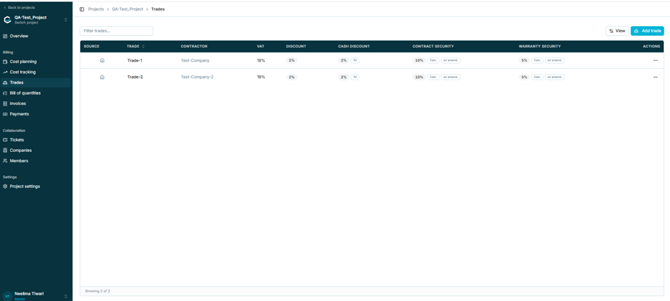
Figure 26 — The Trades list
Each row summarises the commercial terms of one trade so they can be compared at a glance.
|
Column |
Description |
|
Source |
Indicates where the record originated, shown as an icon. |
|
Trade |
Name of the trade. |
|
Contractor |
Company awarded the trade. |
|
VAT |
VAT rate applied to invoices under this trade. |
|
Discount |
General discount applied to all invoices under this trade. |
|
Cash discount |
Early payment discount and the number of days within which it applies (for example 2% / 7d). |
|
Contract security |
Rate, basis, and amendment handling for the contract performance security (for example 10% / Calc. / w/ amend.). |
|
Warranty security |
Rate, basis, and amendment handling for the warranty security (for example 5% / Calc. / w/ amend.). |
|
Actions |
Opens the row action menu. |
Use Filter trades… to narrow the list and View to adjust the displayed columns.
5.6.3 Creating a trade- Open Trades within the project.
- Select Add trade. The Add trade dialog opens.
- Enter the Name and select the Contractor. Both are mandatory.
- Set the commercial terms: VAT, Discount, BoQ warning, Cash discount and Days.
- Optionally record the Order number, Order date, and Order start date.
- Set the Contract performance security and Warranty security. See section 5.6.5.
- Add any General deductions. See section 5.6.6.
- Select Create trade.
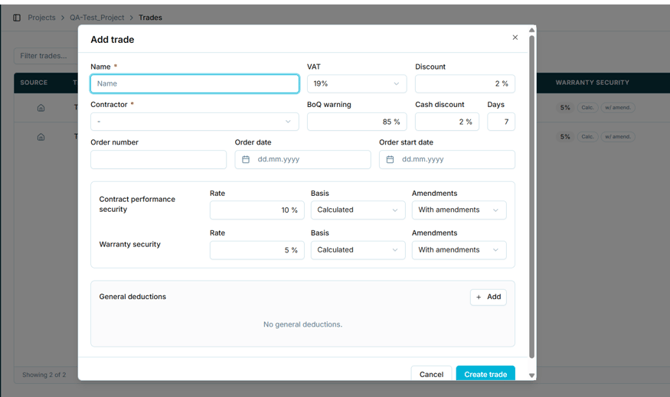 Figure 27 — The Add trade dialog
|
Field |
Mandatory |
Default |
Notes |
|
Name |
Yes |
— |
Name of the trade. |
|
Contractor |
Yes |
— |
Selected from the companies assigned to the project. A contractor must be selected before a bill of quantities can be uploaded. |
|
VAT |
No |
19% |
Options are 19% or 0%. Applied to invoices under this trade. |
|
Discount |
No |
2% |
General discount considered for all invoices under this trade. |
|
BoQ warning |
No |
85% |
Threshold at which a warning is raised against the bill of quantities. |
|
Cash discount |
No |
2% |
Early payment discount. |
|
Days |
No |
7 |
Number of days within which the cash discount applies. |
|
Order number |
No |
— |
Reference number of the order. |
|
Order date |
No |
— |
Date of the order (dd.mm.yyyy). |
|
Order start date |
No |
— |
Date work is due to start (dd.mm.yyyy). |
5.6.5 Securities
Two securities (Sicherheiten) can be defined per trade. They are retained from payments to the contractor and apply at different stages of billing.
|
Security |
Applies to |
Typical rate |
|
Contract performance security |
Interim invoices (Abschlagszahlung, AZ) |
10% of the order amount |
|
Warranty security |
The final invoice (Schlussrechnung) |
5% |
Each security is configured with the same three settings:
|
Setting |
Options |
Meaning |
|
Rate |
Percentage |
The percentage retained. |
|
Basis |
Calculated or Fixed |
Calculated: the required amount is determined on an ongoing basis and any missing security is retained. Fixed: no calculation is performed; the amount recorded is accepted as sufficient. |
|
Amendments |
With amendments or Without amendments |
Determines whether the security is calculated on the original order amount alone, or on the order amount plus approved amendments uploaded as LV. |
Note: Amendments and supplements (Nachträge) refer to the same thing. The Add trade dialog uses "amendments"; other screens use "supplements". Use one term consistently in training material and flag the inconsistency to the product team.
5.6.6 General deductionsGeneral deductions allow custom retentions, fees, or other percentage-based line items to be added to a trade. Select Add to insert a row. Where no deductions have been defined, the panel states that none exist.
|
Field |
Description |
|
Label |
Name of the line item, for example an administrative fee or training cost. |
|
% |
Percentage applied. Default 0%. |
|
Basis |
Whether the percentage is calculated on the gross or net value. Default gross. |
|
Actions |
Removes the line item. |
The following rules were documented for the earlier Ticket Category and are expected to apply to trades. Each needs to be re-tested against the current build before this section is published.
|
Rule |
Status |
|
A trade can be edited as long as no invoice under it has been finalised. |
To be verified by QA |
|
VAT can be changed only before the invoice is finalised for that trade. |
To be verified by QA |
|
A trade cannot be deleted once an LV file has been uploaded against it. |
To be verified by QA |
|
An LV file cannot be uploaded until the trade exists and appears in the Trades list. |
To be verified by QA |
|
A contractor must be selected before a bill of quantities can be imported. |
To be verified by QA |
|
Changes to percentage fields are reflected in the supplier information sheet. |
To be verified by QA |
Caution: These rules govern whether financial data can be changed after billing has started. They are the rules most likely to cause a support call, and the most damaging to get wrong. Do not publish this table until QA has verified each line on the current build.