
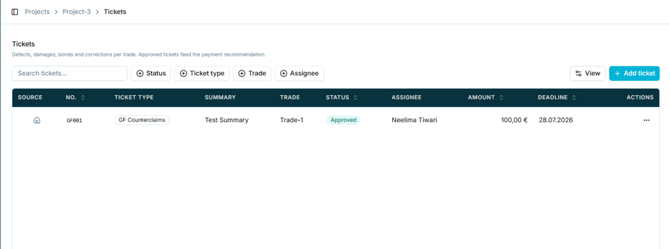
Tickets record defects, damages, bonds, and corrections against a trade. They are not purely a collaboration tool: an approved ticket carries an amount that feeds directly into the payment recommendation for that trade, appearing as a deduction line on the payment calculation described in section 5.10.6.
|
Column |
Description |
|
Source |
Indicates where the ticket originated, shown as an icon. |
|
No. |
Ticket identifier. |
|
Ticket type |
Category of the ticket, which determines how the amount is applied. |
|
Summary |
Short description. |
|
Trade |
Trade the ticket is raised against. |
|
Status |
Draft, Approved, or Closed. |
|
Assignee |
Person responsible. |
|
Amount |
Value of the ticket. |
|
Deadline |
Date by which the ticket should be resolved. |
|
Actions |
Opens the row action menu. |
Search tickets… filters by text, and the Status, Ticket type, Trade, and Assignee filters narrow the list further.
5.12.2 Creating a ticket- Open Tickets within the project.
- Select Add ticket.
- Select the Trade and the Ticket type. Both are mandatory.
- Enter a Summary, and a Description if useful.
- Enter the Amount. Enter it unsigned — whether it is applied as a credit or a debit follows from the ticket type.
- Set the Status. See section 5.12.4.
- Optionally select an Assignee and a Deadline.
- Select Add ticket.
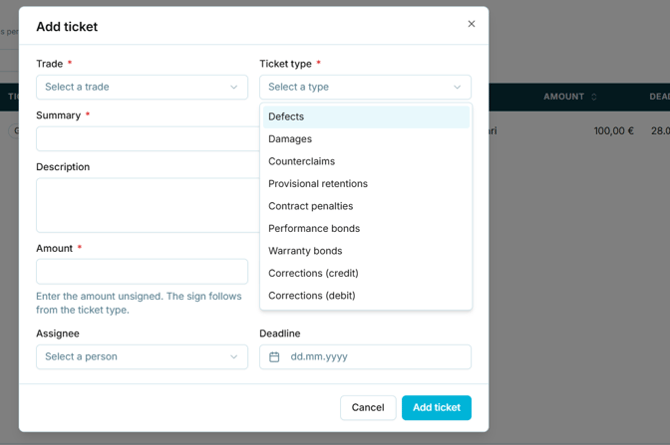
Figure 56 — Selecting a ticket type
5.12.3 Ticket types
The available ticket types are listed below, alongside the category they appear under on the payment calculation.
|
Ticket type |
Appears on the payment calculation as |
|
Defects |
Defects |
|
Damages |
Damages |
|
Counterclaims |
Counterclaims |
|
Provisional retentions |
Provisional retentions |
|
Contract penalties |
Contractual penalties |
|
Performance bonds |
Contract performance guarantees |
|
Warranty bonds |
Warranty bonds |
|
Corrections (credit) |
Corrections |
|
Corrections (debit) |
Corrections |
Note: The amount is always entered unsigned. Corrections are split into credit and debit types precisely so that the direction is carried by the type rather than by the sign of the value.
Note: Tickets synchronised from CAPMO carry type codes prefixed with Z- (for example Z-GF for counterclaims), which is why ticket numbers such as GF001 appear in the list. The full code mapping is given in section 4.4.4.
5.12.4 Ticket status and its financial effect
|
Status |
Effect |
|
Draft |
Excluded from the supplier information calculation. |
|
Approved |
Included in the calculation. This is the default. |
|
Closed |
Excluded from the supplier information calculation. |
Caution: Only tickets in Approved status affect the payment. Both Draft and Closed are excluded. Note that Approved is the default when a ticket is created, so a ticket raised without changing the status will immediately reduce the next payment to that contractor. This is the single most consequential default in the module.
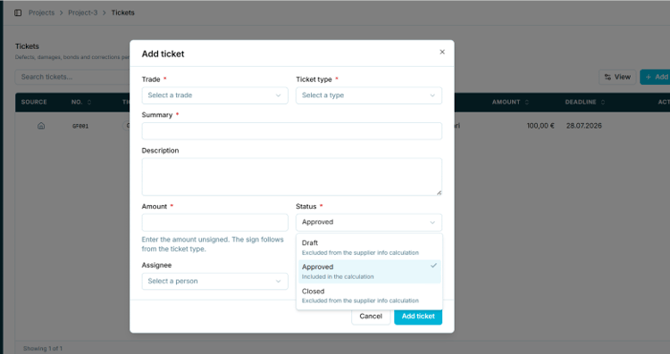
Figure 57 - Ticket status options and their effect on the calculation