
The Payments screen reconciles what the system recommended against what was actually transferred to each contractor. It is organised by trade, with one tab per trade in the project. The transferred amounts recorded here are what the next invoice’s payment calculation treats as previously released payments, so this screen is where over- and underpayments are absorbed into the billing sequence.
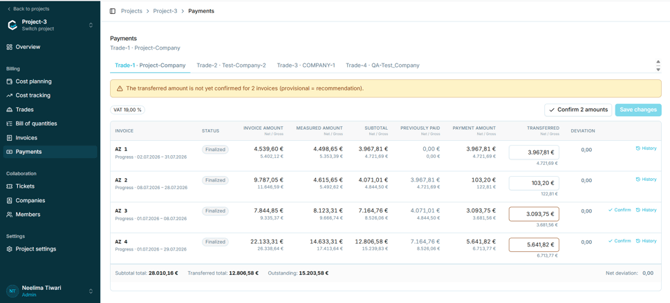
Figure 53 - The Payments screen
A banner appears where transferred amounts have not yet been confirmed, stating how many invoices are affected. Until an amount is confirmed it is provisional and equal to the recommendation. The VAT rate applied is shown as a chip above the table.
5.11.2 The payments tableTotals beneath the table show the subtotal total, the transferred total, the outstanding amount, and the net deviation.
|
Column |
Content |
|
Invoice |
AZ reference, invoice type, and billing period. |
|
Status |
Invoice status, for example Finalized. |
|
Invoice amount |
Amount claimed, net and gross. |
|
Measured amount |
Amount verified at measurement, net and gross. |
|
Subtotal |
Cumulative amount due to date, net and gross. |
|
Previously paid |
Cumulative amount already paid before this invoice. |
|
Payment amount |
Amount due on this invoice. |
|
Transferred |
Editable field recording what was actually paid. Unconfirmed values are highlighted. |
|
Deviation |
Difference between the payment amount and the transferred amount. |
|
Actions |
Confirm, where the amount is still provisional, and History. |
In the captured data the columns resolve consistently across all four invoices of a trade:
|
Relationship |
Observed |
|
Payment amount = Subtotal − Previously paid |
Holds for every row. |
|
Previously paid on one invoice = Subtotal of the preceding invoice |
Holds for every row. |
|
Transferred total = Subtotal of the most recent invoice |
Holds where all amounts have been transferred. |
Note: This confirms that billing is cumulative: each invoice’s subtotal is the running total due to date, and the payment amount is the increment since the previous invoice. This is consistent with the New cumulative labelling on the invoice and measurement screens, and is strong supporting evidence for the outstanding question in Appendix A - though that question should still be closed out by the development team rather than by inference.
5.11.4 Confirming a transferred amount- Open Payments within the project and select the tab for the relevant trade.
- Locate the invoice and check the Transferred amount, adjusting it if the actual payment differed from the recommendation.
- Select Confirm on that row, or Confirm all amounts to confirm every outstanding row at once.
- Select Save changes.
History on each row shows the record of changes to that payment.
Note: Any deviation between the payment amount and the transferred amount is settled automatically against the next invoice. Section 5.11.5 shows the mechanism with a worked example.
5.11.5 Deviations and how they carry forwardWhen the amount actually transferred differs from the payment amount, the Deviation column records the difference. The example below shows an overpayment: the payment amount is 4.334,15 €, 5.000,00 € was transferred, and the deviation of +665,85 € is shown against the row and in the footer as the net deviation.
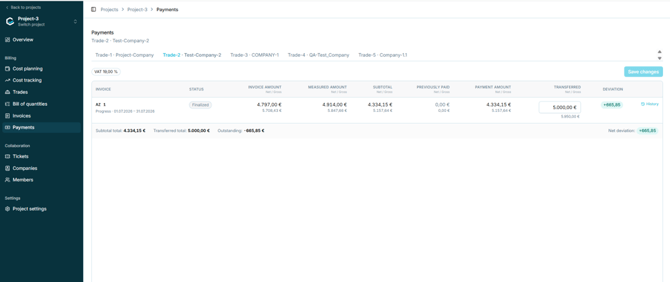
Figure 54 - An overpaid invoice producing a positive deviation
A deviation is not corrected on the invoice where it arose - that invoice is finalised and immutable. Instead it carries forward: the transferred amounts recorded here feed the Previously released payments line of the next invoice’s payment calculation (line 16, section 5.10.3). Because that line reflects what was actually paid rather than what was recommended, an overpayment automatically reduces the amount recommended on the next invoice, and an underpayment increases it.
|
Direction |
Meaning |
Effect on the next invoice |
|
Positive deviation |
More was transferred than the payment amount — the contractor was overpaid. |
Previously released payments is higher, so the next recommended payment is lower. |
|
Negative deviation |
Less was transferred than the payment amount — the contractor was underpaid. |
Previously released payments is lower, so the next recommended payment is higher. |
Note: In the footer of the example above, Outstanding is shown as −665,85 €: a negative outstanding amount means the contractor has been paid ahead of what is currently due. This is the expected way to read a negative value in that field.
Caution: On a trade’s final invoice (Schlussrechnung) there is no next invoice to absorb a deviation. How a residual deviation is settled at that point - repayment, offset elsewhere, or manual handling outside the system - remains to be confirmed and is listed in Appendix A.