
Cost planning is where the project budget is entered, structured by DIN 276 cost groups. It allows planned costs to be compared against forecast completion values so that financial progress can be monitored. The budget entered here is also what the Overview and Cost tracking screens compare the forecast against.
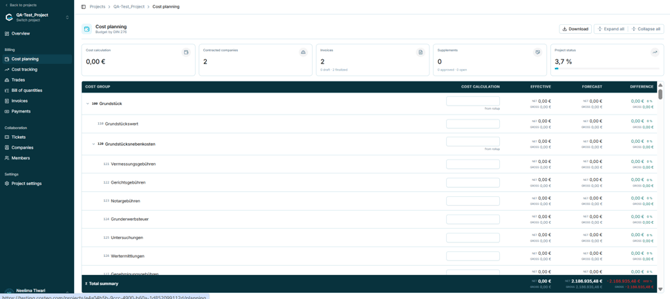
Figure 23 - Cost planning, structured by DIN 276
5.4.2 Summary cards|
Card |
What it shows |
|
Cost calculation |
Total of all cost values entered across the project. Updates automatically as values are entered or edited in the Cost calculation column. |
|
Contracted companies |
Number of companies under contract in the project. |
|
Invoices |
Invoice count, split into draft and finalized. |
|
Supplements |
Supplement count, split into approved and open. |
|
Project status |
Progress indicator shown as a percentage. |
Note: Earlier documentation describes header cards for Project VAT, Main Categories, Cost Groups with Budget, and Planning Completion. These are not present in the current interface. See Appendix B.
5.4.3 About DIN 276 cost groupsDIN 276 is the German standard for classifying building costs. costeo uses it as the structure for both Cost planning and Cost tracking, so that costs are broken down in a standardised and consistent way. Each code corresponds to a specific cost category, for example:
- 100 - Grundstück (land / property)
- 200 - Vorbereitende Maßnahmen (preparatory measures)
- 300 - Bauwerk – Baukonstruktionen (building construction)
Each main cost group summarises all subgroups beneath it. For example, 100 Grundstück contains 110 Grundstückswert and 120 Grundstücksnebenkosten, which in turn contains 121 Vermessungsgebühren, 122 Gerichtsgebühren, and so on. Use the arrow beside a cost group to expand or collapse it, or Expand all and Collapse all at the top of the screen.
5.4.4 The cost group table|
Column |
Description |
|
Cost group |
The DIN 276 code and the name of the cost group, identifying the type of work or expense. |
|
Cost calculation |
Editable field holding the planned budget for that cost group, entered manually from the cost estimate or from imported data. Parent rows show "from rollup", meaning the value is the sum of the rows beneath. |
|
Effective |
Actual value recorded for the cost group, shown as both NET and GROSS. |
|
Forecast |
Projected total cost for the cost group after supplements, risks, and changes during the project, shown as both NET and GROSS. |
|
Difference |
Difference between the forecast and the cost calculation, shown as an amount and as a percentage. |
Note: Net is the value before VAT; gross includes VAT at the rate set in Project settings. With VAT at 19%, entering 10.000,00 € net produces 11.900,00 € gross.
The Difference column indicates whether a cost group is running above or below its planned budget. Read alongside the percentage column, it shows at a glance which groups need attention.
A Total summary row is fixed at the bottom of the table and consolidates the net and gross cost calculation, the total forecast, the overall difference, and the overall percentage difference. Select Download to export the cost plan.