
The Overview is the project dashboard. It summarises the financial position of the project, progress against billing, the state of each module, and recent activity.
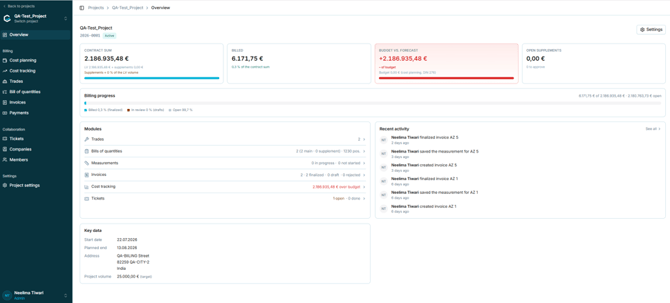
Figure 18 - The project Overview
5.2.2 Summary cards
|
Card |
What it shows |
|
Contract sum |
LV value plus approved supplements. The subtext states the supplement share of the LV volume. |
|
Billed |
Value billed so far, with its percentage of the contract sum. |
|
Budget vs. forecast |
Difference between the forecast and the budget entered in Cost planning (DIN 276). Shown in red when over budget. |
|
Open supplements |
Value of supplements awaiting approval, with a count of items to approve. |
Caution: The Budget vs. forecast card compares the forecast against the budget entered in Cost planning, not against the Project volume in Project settings. If no cost calculation has been entered in Cost planning, the budget is zero and the project will always be reported as over budget.
5.2.3 Billing progress
The Billing progress bar splits the contract sum into three states, each with a colour key beneath the bar:
- Billed (finalized) - invoices that have been finalised
- In review (drafts)- invoices still in draft
- Open — the remainder of the contract sum not yet billed
The values to the right of the bar show the billed amount, the contract sum, and the open amount.
5.2.4 Modules panelThe Modules panel lists the main working areas with a short status for each, and links through to them.
|
Module |
Status information shown |
|
Trades |
Number of trades in the project. |
|
Bills of quantities |
Number of BoQs, split into main and supplement, plus the total position count. |
|
Measurements |
Number in progress and not started. |
|
Invoices |
Total, split into finalized, draft, and rejected. |
|
Cost tracking |
Amount over or under budget. |
|
Tickets |
Number open and done. |
Recent activity lists the most recent changes with the user, the action, and how long ago it occurred. Select See all for the full history. Key data repeats the project start date, planned end, address, and project volume.