
The project Companies screen lists the companies involved in this project. Companies are either linked from the organisation address book described in section 4.3, or created specifically for this project.
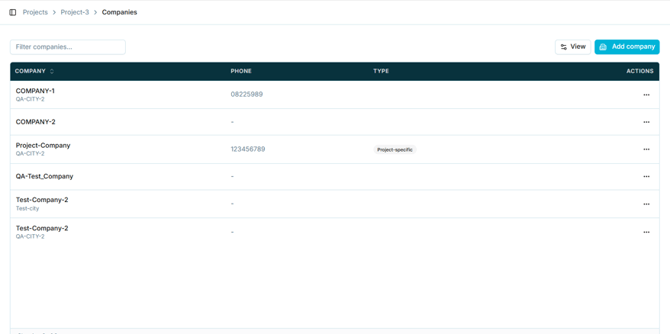
Figure 58 - Companies within a project
The list shows the company name with its city, phone number, and a type indicator. Companies created for this project alone are marked Project-specific; companies linked from the address book carry no such marker.
Note: This explains the Source column on the organisation-level Companies list in section 4.3: a company record is either shared across the workspace or specific to one project.
5.13.2 Adding a company to a projectSelect Add company. The dialog offers two routes.
5.13.3 Linking from the address book- Select the From address book tab.
- Search for the company by name.
- Tick one or more companies.
- Select Link company(ies). The button shows how many are selected.
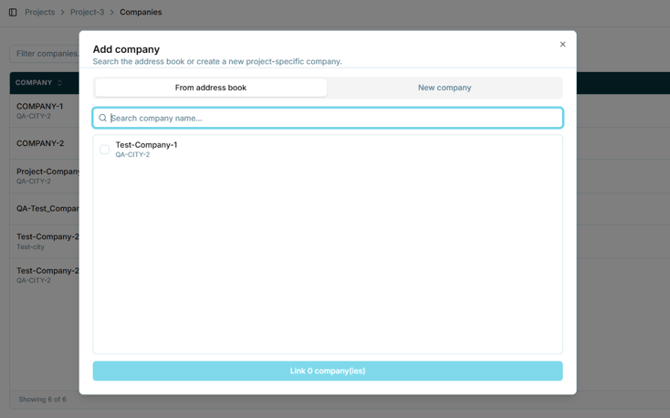
Figure 59 - Linking a company from the address book
5.13.4 Creating a project-specific company- Select the New company tab.
- Enter the Company name. This is mandatory.
- Optionally enter the address, country, and phone number.
- Select Create and link company.
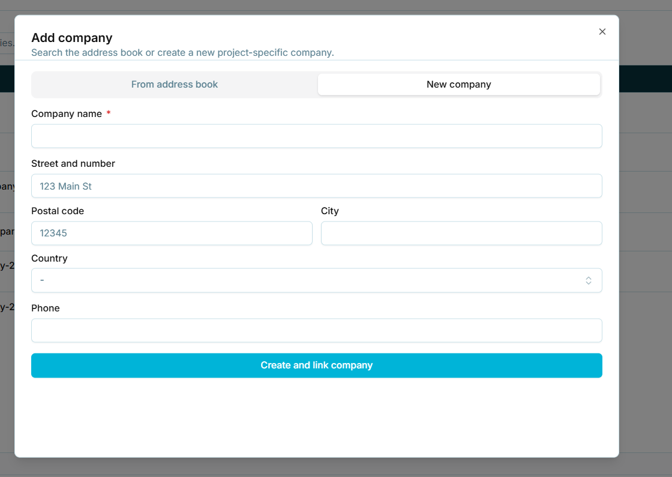
Figure 60 - Creating a project-specific company
Note: Unlike the organisation-level Add company dialog in section 4.3.2, Company name here is explicitly marked as mandatory. The project-level dialog also omits the Tax ID field.