
Nach der Anmeldung öffnet sich der Arbeitsbereich mit der Projektliste. Der Bildschirm ist in eine feste Navigationsleiste auf der linken Seite und einen Inhaltsbereich auf der rechten Seite unterteilt.
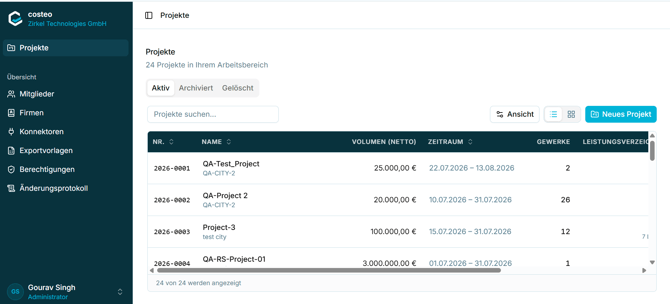
Abbildung 5 - Die Projektliste und die seitliche Hauptnavigationsleist
Die Seitenleiste enthält die folgenden Elemente:
|
Element |
Purpose |
|
Organisation header |
Shows the costeo logo and the name of the organisation you are signed in to. |
|
Projects |
Opens the project list. This is the main working area. |
|
Administration > Members |
Manage the people in your organisation and their organisation role. |
|
Administration > Companies |
Address book of clients, subcontractors, and suppliers. |
|
Administration > Connectors |
Manage external integrations and their sync settings. |
|
Administration > Export Templates |
Manage letterheads used when reports are generated as PDF. |
|
Administration > Permissions |
Define reusable permission presets for project members. |
|
User panel (bottom left) |
Shows your name and organisation role, and gives access to account options. |
Hinweis: Der Bereich „Verwaltung“ ist nur für Benutzer mit der entsprechenden Organisationsrolle relevant. Mitglieder mit eingeschränkten Rechten sehen möglicherweise nicht alle dieser Einträge.